

Shapes#
In ProteoTwirl, a shape describes how a protein appears when viewed from
a specific orientation. Shapes are created by ShapeCalculator which
takes 2D coordinates of atoms, as they are seen from a specific orientation
and creates a shape around these atomic points, in the form of a Shapely
Geometry object.
A ShapeCalculator behaves like other ProteoTwirl properties in that
it is added to a ProteinRotation object and evaluated over a set of
sampled orientations. The main difference is that its output is a shape,
rather than a numerical or categorical value.
ProteoTwirl includes several methods for converting projected atomic coordinates into shapes. These are described in Shape Methods. Most methods use only the atomic coordinates and therefore treat atoms as points. The exception is disk overlap, which explicitly represents atoms as disks with atomic radii. For the other methods, radii-handling approaches can be used to expand or adjust the calculated shape so that atomic radii are taken into account. See Radii Handling for more details.
Calculating a Shape#
Shapes can be added to a ProteinRotation object in the same way as
other properties, using the .add_property method. The example below
loads a protein and calculates an alpha shape for each sampled
orientation.
import ProteoTwirl.ProteinRotation as pt

protein_structure = pt.ProteinRotation(
    protein                 = "8JXW_H.pdb",             # Protein structure to load
    selection               = "protein and segid E and not element H",
    base_rotation           = "principle",              # Align to the principal axes
    center_selection        = True,                     # Center the selection at (0, 0, 0)
    atom_radii              = "vdw",                    # Definition of atomic radii to use

    # Default values avoid having to re-enter these for each added property
    default_rotation_res    = 128,                      # Number of orientations to sample
    default_rotation_range  = None,                     # Optional min/max values for theta and phi
    default_selectors       = None,                     # Optional orientation-dependent atom selectors
    default_sampler         = None,                     # Sampling method; currently Fibonacci sphere only
)

protein_structure.add_property(
    property        = "Alphashape",
    use_default     = False,
    rotation_res    = 32,
    workers         = 1,
)
Default Shape#
The first time a shape is added to a ProteinRotation object, that
shape is set as the default shape. If a shape property is later added
without specifying which shape to use, ProteoTwirl uses this default
shape.
The current default shape name can be accessed with:
default_shape_name = protein_structure.default_shape_prop
The default shape can be changed with:
protein_structure.set_default_shape_prop("Name_Of_New_Default_Shape")
Shape Methods#
ProteoTwirl includes multiple methods for calculating a shape from projected atomic coordinates. The best method depends on the protein, the desired accuracy, and the acceptable computational cost.
As a rough guide:
use convex hull for a fast, coarse estimate (good for globular protein);
use concave hull when indentations matter but holes do not;
use alpha shape when both indentations and holes should be captured or disconnected segments are present;
use disk overlap same as alpha-shape but higher accuracy for area, but slow.
Shape Method Overview#
The table below compares the four shape-calculation methods applied to two proteins. It shows both the resulting shape and the approximate calculation time for each method.
Method |
9I3S [52990 atoms] |
8JXW, segID E [2153 atoms] |
|---|---|---|
Convex Hull |

32 orientations: 1.0 s |

32 orientations: 0.044 s |
Concave Hull |

32 orientations: 9.4 s |

32 orientations: 0.2 s |
Alpha Shape
|

32 orientations: 60.04 s |

32 orientations: 1.8 s |
Disk Overlap |

32 orientations: 247.3 s |

32 orientations: 5.8 s |
The cheatsheet below summarizes which features each method can capture.
Method |
Captures Indentations |
Captures Holes |
Requires Radii Handling |
Main Parameters |
|---|---|---|---|---|
Convex Hull |
|
|
|
|
Concave Hull |
|
|
|
|
Alpha Shape |
|
|
|
|
Disk Overlap |
|
|
|
|
Convex Hull#
A convex hull for a set of points, is a boundary thats tightly wrapped around all the points. A convex hull does therefore not allow for indentations nor hole in the shape.
For area estimations convex-hull is likely to produce an over-estimation of the area, especially when holes or indentations are present.
Convex-hull is on the other hand computationally very inexpensive, and for globular proteins, with little indentation or holes, it can provide fast shape estimations.

Concave Hull#
A concave hull is similar to a convex hull in that it wraps a boundary around a set of points. Unlike a convex hull, it can capture indentations. However, concave hulls do not capture holes.
Concave hulls can provide useful shape estimates for proteins without holes. They are slower than convex hulls, but substantially faster than alpha shapes and disk overlap in the examples above.
The concave-hull method requires a ratio parameter. The default is
ratio = 0.1. This parameter controls how tightly the boundary wraps
around the points and how much local detail is captured. ratio takes
a value between 0 and 1.
|
|
|
|---|---|---|

|

|

|
Alpha Shape#
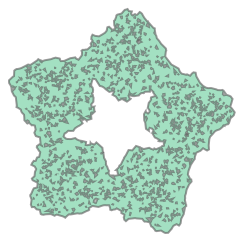
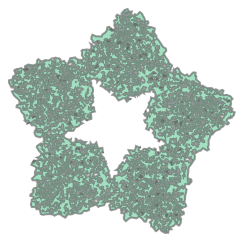
An alpha shape can capture both indentations and holes. This makes it more flexible, and often more accurate than convex and concave hulls, but it also has a higher computational cost.
The main parameter is alpha, which controls how much detail is
captured in the produced shape. alpha takes a value between 0 and
1.
|
|
|
|---|---|---|

|
|
|
ProteoTwirl’s alpha-shape implementation also provides cleanup options.
The hole_fill parameter controls whether holes are filled based on
their relative size. hole_fill takes a value between 0 and 1.
For example, hole_fill = 0.2 means that holes smaller than 20% of the
area of the polygon containing them are filled.
|
|
|
|---|---|---|
|
|

|

|
The min_island_area parameter removes small disconnected polygons.
It is given as a value between 0 and 1 and is interpreted as a
fraction of the largest polygon. For example, if min_island_area is
0.05, disconnected polygons smaller than 5% of the largest polygon
are removed.
The local_k parameter controls how many neighboring points are used
when calculating the shape. Lower values make the shape more sensitive to
local changes, while larger values produce a smoother shape.
|
|
|
|---|---|---|

|

|

|
Disk Overlap#
The disk-overlap method constructs a shape by representing each atom as a disk centered on its projected position. The radius of each disk is the radius of the corresponding atom. These disks are then merged into a single shape.
Disk overlap can produce accurate cross-sectional shapes because it explicitly includes atomic radii. However, it is relatively slow, especially for larger proteins, and it can produce many small disconnected polygons.
Unlike the other methods, disk overlap does not require
radii_handling because atomic radii are already included in the
calculation.
For cross-sectional area calculations, disk overlap is likely to provide the most physically direct estimate among the available methods.
Custom Shape Calculators#
You can implement a custom shape-calculation method in ProteoTwirl by
inheriting from the ShapeCalculator class and overriding the
_shape_imp method.
The _shape_imp method receives the same type of information as the
_run_imp method used for other properties. This includes:
the selected MDAnalysis
AtomGroupinselection;the rotated positions of the selected atoms in
positions;values of required existing properties in
existing_props;the original
ProteinRotationobject inprotein_rotation.
def _shape_imp(
    self,
    selection: AtomGroup,
    positions: NDArray[np.float64],
    existing_props: dict[str, Any] | None,
    protein_rotation: ProteinRotation | None,
):
    ...
The output of _shape_imp should be a Shapely geometry object.
A simple example is the ConvexHull shape calculator. Without the
docstring, it can be written as a relatively small class. The
@Property.register decorator allows the shape calculator to be
accessed later by one of its registered names and makes it appear in
Property.available. When registering a ShapeCalculator, set
kind="ShapeCalculator".
@Property.register("ConvexHull", "convex_hull", kind="ShapeCalculator")
class ConvexHull(ShapeCalculator):

    def __init__(
        self,
        radii_handling: str | None | Callable = None,
        radii: NDArray[np.float64] | None = None,
        property_name: str | list[str] | None = None,
        existing_prop_names: list[str] | None = None,
        angle_space_id: int | None = None,
        progress_bar: bool = True,
        rotation_res: int = 100,
        rotation_range: tuple[float, float] | tuple[tuple[float, float], ...] | None = None,
        selectors: list[Any] | None = None,
        rotation_iter: RotationCounter | None = None,
        radii_handling_kwarg: dict[str, Any] | None = None,
        **kwargs,
    ) -> None:

        if property_name is None:
            property_name = "Convex_Hull"

        super().__init__(
            property_name       = property_name,
            radii_handling      = radii_handling,
            radii               = radii,
            existing_prop_names = existing_prop_names,
            angle_space_id      = angle_space_id,
            progress_bar        = progress_bar,
            rotation_res        = rotation_res,
            rotation_range      = rotation_range,
            selectors           = selectors,
            rotation_iter       = rotation_iter,
            radii_handling_kwarg= radii_handling_kwarg,
            **kwargs,
        )

    def _shape_imp(
        self,
        selection: AtomGroup,
        positions: NDArray[np.float64],
        existing_props: dict[str, Any] | None,
        protein_rotation: ProteinRotation | None,
    ) -> Any:

        points = MultiPoint(positions[:, [0, 1]])
        return convex_hull(points)
Once the class is set up, ProteoTwirl handles the remaining property machinery, including rotation handling, multithreading, and optional radii handling.
Radii Handling#
With the exception of disk overlap, the shape-calculation methods described above construct shapes from atomic coordinates and do not inherently include atomic radii. To adjust these shapes so that atomic radii are taken into account, ProteoTwirl provides several radii-handling methods.
A radii-handling method can be set with the radii_handling argument
for the relevant ShapeCalculator. Additional keyword arguments for the
radii-handling method can be passed using radii_handling_kwarg.
protein_structure.add_property(
    property             = "Alphashape",
    alpha                = 0.4,
    hole_fill            = 0.2,

    # Radii-handling method
    radii_handling       = "Simple_Buffer",

    # Keyword arguments for the radii-handling method
    radii_handling_kwarg = {
        "mode"      : "mean",
        "quad_segs" : 8,
    },

    use_default          = False,
    rotation_res         = 32,
    workers              = 1,
)
Size and Radii Effects#
Most shape-calculation methods increase in computational cost as the protein size increases. However, the larger the protein, the smaller the relative contribution of individual atomic radii often becomes to the overall shape.
For large proteins, it may therefore be preferable to avoid radii handling if a rough shape estimate is sufficient. For small proteins or when accurate cross-sectional areas are important, radii handling or disk overlap may be more appropriate.
Radii-Handling Method Overview#
The table below compares different radii-handling methods. The examples
use the small protein 4RUN to make the differences easier to see. All
methods are used with an alpha shape using alpha = 0.4 and
hole_fill = 0.2.
The Δ Time row shows the additional time relative to running the code
without radii handling.
As a baseline area comparison, a disk-overlap shape was calculated for
the same setup. This took 3.25 s and gave an area of 1211 Å\(^2\).
The Δ Area row indicates how much each method’s calculated area
differs from the disk-overlap area for angle #24.
None |
Simple Buffer |
Disk-Vertex Adjustment |
Disk-Boundary Adjustment |
Edge Pad |
|
|---|---|---|---|---|---|
Shape
|

|

|

|

|

|
Time 32 orientations |
0.98 s |
0.98 s |
1.24 s |
2.76 s |
1.64 s |
\(\Delta\) Time |
N/A |
\(+ 0\) s |
\(+ 0.26\) s |
\(+ 1.78\) s |
\(+ 0.66\) s |
Area angle #24 |
980 Å\(^2\) |
1270 Å\(^2\) |
1207 Å\(^2\) |
1213 Å\(^2\) |
1275 Å\(^2\) |
\(\Delta\) Area |
-238 Å\(^2\) |
+59 Å\(^2\) |
-4 Å\(^2\) |
+2 Å\(^2\) |
+64 Å\(^2\) |
No Radii Handling#
If radii_handling is None, no radii handling is performed. The
protein shape is then based only on atomic coordinates. For size and area
estimates, this can substantially underestimate the shape, especially for
small proteins.
Simple Buffer#
The simple-buffer radii handler adds a constant padding around the shape. By default, the padding is based on the mean atomic radius in the selection. Simple buffer is a rough approximation, but it is computationally inexpensive.
To use simple buffer, set:
radii_handling = "Simple_Buffer"
Simple buffer can optionally take two arguments:
mode: determines how the atomic radii are aggregated. The default is"mean", but"min"or"max"can also be used.quad_segs: determines the resolution of the padded boundary. The default is8.
Disk-Vertex Adjustment#
Disk-vertex adjustment adds a disk at each corner of the shape, corresponding to the radius of the atom positioned at that corner. It is slower than simple buffer but faster than disk-boundary adjustment and edge padding.
This method is most appropriate when the boundary of the shape is already detailed and no long edges are present.
To use disk-vertex adjustment, set:
radii_handling = "Disk_Vertex"
Disk-vertex adjustment takes two arguments:
quad_segs: determines the resolution of the added disks. The default is8.include_holes: ifFalse, the inside of holes in the shape is not padded.
Disk-Boundary Adjustment#
Disk-boundary adjustment identifies atoms that lie close to the edges of the shape and adds disks at those atom positions. This is slightly more accurate than disk-vertex adjustment, but somewhat slower.
To use disk-boundary adjustment, set:
radii_handling = "Disk_Boundary"
Disk-boundary adjustment takes two arguments:
quad_segs: determines the resolution of the added disks. The default is8.require_center_inside: determines whether the atom center must be inside the shape to be included.
Edge Padding#
Edge padding adds padding along each edge segment of the shape. It is similar to simple buffer, but uses the atoms that define the endpoints of each edge to determine how much padding should be added.
To use edge padding, set:
radii_handling = "Edge_Pad"
Edge padding takes up to three arguments:
quad_segs: determines the resolution of the added disks. The default is8.include_holes: ifFalse, the inside of holes in the shape is not padded.edge_radius_mode: determines which of the two endpoint atom radii to use. The default is"max".
Custom Radii Handling#
Instead of providing the name of a preset radii-handling method, you can
also provide a custom function. The function should take the Shapely
geometry, the atom positions, and the atom radii as input. Keyword
arguments from radii_handling_kwarg are passed to the function.
import numpy as np

def custom_radii_handler(
    shape,       # Shapely geometry to adjust
    positions,   # Atomic positions
    radii,       # Atomic radii
    **kwargs,    # Values from radii_handling_kwarg
):
    buffer_radius = float(np.mean(radii))
    return shape.buffer(buffer_radius)

protein_structure.add_property(
    property        = "Alphashape",
    radii_handling  = custom_radii_handler,
)